
Monday, June 17, 2013
200 downloads: Icons DB – 1800+ Flat Icons In Any Color
200 downloads: Icons DB – 1800+ Flat Icons In Any Color: Sometimes we find an icon, love its design but the colors don’t fit to the project. With Icons DB , a fr...

Icons DB – 1800+ Flat Icons In Any Color
Sometimes we find an icon, love its design but the colors don’t fit to the project.
With Icons DB, a free and growing set of flat icons, that is not possible as we can get all the items in any color we prefer.
The set includes 1800+ items in multiple formats (ICO, PNG, JPG, GIF) and 8 sizes from 16*16px to 512*512px.

There are many icons which can fit very well to web apps and almost each item has multiple variations that can satisfy each taste.
Only drawback is the inability to download the whole set as they are only offered one-by-one.
Website: http://www.iconsdb.com/With Icons DB, a free and growing set of flat icons, that is not possible as we can get all the items in any color we prefer.
The set includes 1800+ items in multiple formats (ICO, PNG, JPG, GIF) and 8 sizes from 16*16px to 512*512px.
There are many icons which can fit very well to web apps and almost each item has multiple variations that can satisfy each taste.
Only drawback is the inability to download the whole set as they are only offered one-by-one.
Wednesday, July 11, 2012
Griffin Technology Announces Availability of MIDIConnect for iOS Devices [Video]
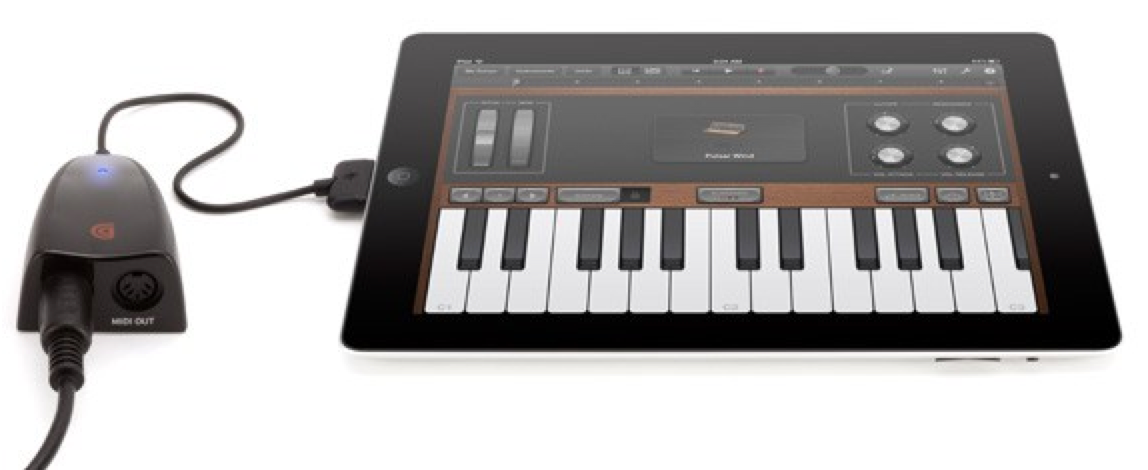
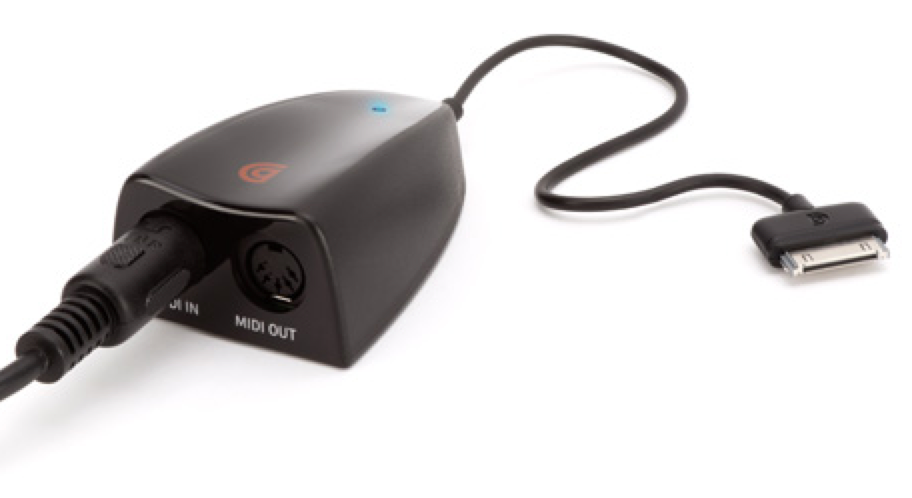
Griffin Technology has announced the availability of MIDIConnect, a MIDI in and out interface for iPod touch, iPhone and iPad.
MIDIConnect adds a MIDI input and output to iOS devices. Intuitive to use, MIDIConnect allows you to plug MIDI keyboards and other MIDI-capable devices into an iPad, iPod touch or iPhone. Play your MIDI instrument straight into GarageBand or other MIDI-capable apps, or download MIDI Controller apps to use the MIDI out port and your touchscreen in performance, as a MIDI controller. Both MIDI in and out ports are industry-standard 5-pin DIN connectors, compatible with most commonly available MIDI cables and connectors.
"MIDIConnect offers musicians a compact and portable solution to create and edit music on the go, at a fraction of the cost of a recording studio," said Ethan Opelt, Line Manager of Griffin's Audio category. "We are excited to be showcasing MIDIConnect as well as Griffin's lineup of music products at Summer NAMM, taking place in Nashville, our home town."
MIDIConnect is now available for $79.99 at the link below...
Read More


MIDIConnect adds a MIDI input and output to iOS devices. Intuitive to use, MIDIConnect allows you to plug MIDI keyboards and other MIDI-capable devices into an iPad, iPod touch or iPhone. Play your MIDI instrument straight into GarageBand or other MIDI-capable apps, or download MIDI Controller apps to use the MIDI out port and your touchscreen in performance, as a MIDI controller. Both MIDI in and out ports are industry-standard 5-pin DIN connectors, compatible with most commonly available MIDI cables and connectors.
"MIDIConnect offers musicians a compact and portable solution to create and edit music on the go, at a fraction of the cost of a recording studio," said Ethan Opelt, Line Manager of Griffin's Audio category. "We are excited to be showcasing MIDIConnect as well as Griffin's lineup of music products at Summer NAMM, taking place in Nashville, our home town."
MIDIConnect is now available for $79.99 at the link below...
Read More
How to Restore Your iPhone Unlock Ticket [SAM]
| These are instructions on how to restore your iPhone unlock ticket obtained using the SAM unlock method. If you've unlocked with SAM but haven't backed up your unlock ticket, you should do so immediately by following this tutorial. To follow these instructions you will need to have the unlock ticket and iFile installed. You can get iFile from Cydia. Step One Insert your previously unlocked SIM card and make sure SAM is disabled in SAMPrefs.  Step Two Email yourself the zip archive created when you backed up your unlock ticket. Open the email on your iPhone and tap to open the attachment. When prompted to select an application to open the attachment with choose iFile.   Step Three When iFile opens it will ask you to choose between Zip Viewer and Unarchiver. Choose Unarchiver and tap the Done button when it's completed extracting.   Step Four Tap the Edit button at the top right of the screen and select the Lockdown folder that was just extracted.   Step Five Press the Clipboard button at the bottom right and choose Copy/Link from the popup menu. Then press the Done button at the top right of the screen.   Step Six Use the back button at the top left of the screen to navigate to the /var/root/Library folder. Press the Edit button at the top right of the screen and select the Lockdown folder.   Step Seven Tap the Trash icon at the bottom of the screen and choose Move File to Trash from the menu that appears.   Step Eight Tap the Clipboard icon at the bottom right of the screen and choose Paste from the menu that appears.   Step Nine Press the Done button at the top right of the screen then reboot your device.  Step Ten Once your iPhone has been restarted it will pick up the network for the unlocked SIM card.  | ||
SwipeSiri: Easily Dismiss Siri With A Swipe [Tweak]
Since Apple released iPhone 4S and introduced Siri the best feature in iPhone 4S and too many users are enjoying it especially after jailbreaking their A5 device like iPhone 4S/ iPad 2, so from the day that untethered jailbreak released for iPhone 4S and developers made too many nice tweaks that works on Siri and one of this awesome jailbreak tweaks called SwipeSiri and it will allows you to easily dismiss Siri with only one swipe...

ALL Jailbreak & Unlock GUIDES for iPhone, iPod touch and iPad
The last few weeks we got three
jailbreak tools for iOS 4.1 on iPhone 4, 3GS, 3G, iPod touch 4G, 3G, 2G
and iOS 3.2.2 on iPad (i.e. Limera1n, GreenPois0n and PwnageTool), in
addition to the presence of other jailbreak tools for all several iOSs,
all this has led a confusion among iDevices users, so I decided to
collect all iOSs, jailbreak guides and unlock guides for all existing
iDevices in one article. Check them after the jump.
iPhone 4
|
iOS
|
Baseband
|
Jailbreak Guide
|
Unlock Guide
|
Jailbreak
Compatibility
|
 |
2.10.04
| ||||
01.59.00
| |||||
01.59.00
|
Through Safari (Web based)
| ||||
01.59.00
|
Through Safari (Web based)
| ||||
Notes:
· iOS 4.1 can be unlocked while preserving the baseband.
· Latest version for iPhone 4 is iOS 4.1
· All jailbreak above are untethered jailbreaks.
· You have to jailbreak your device with one tool only.
| |||||
iPhone 3GS
|
iOS
|
Baseband
|
Jailbreak Guide
|
Unlock Guide
|
Jailbreak OS Compatibility
|
 |
05.14.02
| ||||
05.13.04
| |||||
05.13.04
|
Through Safari (Web-based)
| ||||
05.13.04
|
Through Safari (Web-based)
| ||||
Notes:
· iOS 4.1 can be unlocked while preserving the baseband (PwnageTool only).
· Latest version for iPhone 3GS is iOS 4.1
· All jailbreak above are untethered jailbreaks.
· You have to jailbreak your device with one tool only.
| |||||
iPhone 3G
|
iOS
|
Baseband
|
Jailbreak Guide
|
Unlock Guide
|
Jailbreak
Compatibility
|
|
05.14.02
| ||||
05.13.04
| |||||
05.13.04
|
Through Safari (Web based)
| ||||
05.13.04
|
Through Safari (Web based)
| ||||
Notes:
· Latest version for iPhone 3G is iOS 4.1
· All jailbreak above are untethered jailbreaks.
· You have to jailbreak your device with one tool only.
| |||||
iPod Touch 4G
|
iOS
|
Jailbreak Guide
|
Jailbreak
Compatibility
|
 | |||
Notes:
· Latest version for iPod touch 4G is iOS 4.1
· All jailbreak above are untethered jailbreas.
· You have to jailbreak your device with one tool only.
| |||
iPod Touch 3G
|
iOS
|
Jailbreak Guide
|
Jailbreak
Compatibility
|
 | |||
Through Safari (Web based)
| |||
Through Safari (Web based)
| |||
Notes:
· Latest version for iPod touch 3G is iOS 4.1
· All jailbreak above are untethered jailbreaks.
· You have to jailbreak your device with one tool only.
| |||
iPod Touch 2G
|
iOS
|
Jailbreak Guide
|
Jailbreak
Compatibility
|
 | |||
Through Safari (Web based)
| |||
Through Safari (Web based)
| |||
Notes:
· Latest version for iPod touch 2G is iOS 4.1
· All jailbreak above are untethered jailbreaks (except Redsn0w with MC Models).
· You have to jailbreak your device with one tool only.
| |||
iPad
|
iOS
|
Jailbreak Guide
|
Jailbreak
Compatibility
|
 | |||
Through Safari (Web based)
Mac – Windows – Linux
| |||
Through Safari (Web based)
Mac – Windows – Linux
| |||
Notes:
· Latest version for iPad is iOS 3.2.2
· All jailbreak above are untethered jailbreaks.
· You have to jailbreak your device with one tool only.
| |||
Apple TV 2G
|
iOS
|
Jailbreak Guide
|
Jailbreak
Compatibility
|
 | |||
Notes:
· Latest version for Apple TV 2G is iOS 4.1
· All jailbreak above are untethered jailbreaks.
· You have to jailbreak your device with one tool only.
| |||
You have to add this page to your favorite, as this page will be always updated with the new jailbreak and unlock tools and guides.
Monday, March 14, 2011
PictureShow 3.0 - iPhone iPad & iPod touch
PictureShow 3.0 - iPhone iPad & iPod touch
PictureShow 3.0 - iPhone iPad & iPod touch | English | 19 Mb
PictureShow emulates various toy camera styles.
It enables you to mix frame, light leak and noise to create an unexpected result with simple shuffle button.
and edit each effect via 'TextEdit', 'StyleEdit' and 'ColorEdit' mode.
● Key features 37 stunning & stylish photos.
Quick and Easy navigation between styles.
Easy and real time editing.
Write messages on photos.
Sharing photo via 'Twitter', 'FaceBook', 'Tumblr','Flickr', 'Blogger' & E-mail in the app.
21 Frame styles
10 Light effects
10Noise effects.
You can mix all of this effect with super easy.
● Camera Lens Kit
5 camera lens are supported.
(single, Quad, Vertical Quad, Multi-Exposure and HalfShot Lens)
● TiltShift & HDR
You can create more stunning image with mixing TiltShift and HDR functions with other effects like Frame, Noise and Light Leak.
● Crop & Flip
6 presets are supported.
● Recipe
You can save your custom style with easy.
● 37 Photo filter
Lomography : Simulate 'Lomo' camera tone.
Holgagraphy : Simulate 'Holga' camera tone.
Instant : Simulate instant camera's tone.
Noire : Black & white french movie poster tone.
Quad : 4 tiled image.
Quad Vertical : 4 tiled vertical image.
Mirror : Funny and odd image specially with face.
DarkSepia : Vintage and soft effect.
MultiExposures : Complex and unexpected Image.
ColorShake : displaced color channel.
Retro : 70's photo style.
Other Vintage & color effected Style in app.
● Color Edit
Change color without slider. Just swipe left or right!
Select color mode(red, green, blue, bright) and then swipe finger on photo area horizontally.
You can make color filtered effect by changing specific color element.
- Red, Green, Blue, Brightness, Contrast
● Text Edit
Change text style.
Select text mode(font, size, align, color) and then swipe finger on photo area horizontally.
or Move it. simple.
● Sharing
Twitter, FaceBook, Tumblr, Flickr, Mail, Blogger
● Various Resolution
- 450 * 600 px
- 600 * 800 px
- 900 * 1200px
- 1200 * 1600 px
- Original Size
Download (HotFile)
Download (FileSonic)
___________________________________________________________
Real Racing 2 HD 1.00 for IPad

 Real Racing 2 HD 1.00
Real Racing 2 HD 1.00
Platform: iPad
Release: 2011
Publisher: Firemint Pty Ltd
Developer: Firemint Pty Ltd
Genre: Action | Racing
Language: En
Size: 387.11 MB [b](FSO+FS+ULD)
Are you ready for the ultimate racing experience for iOS? Optimized specifically for iPad and iPad 2, Real Racing 2 HD is a heart-pounding, visually astounding 3D racer that puts the steering wheel directly in your hands. The expansive, 10-plus hour career mode and extensive, one-of-a-kind multiplayer means the fight for first place is never over.
PRAISE FOR REAL RACING 2 ON iPHONE:
★★★★★ "The epitome of iPhone and iPod touch gaming."– Pocket Gamer, Platinum Award
★★★★★ "Singlehandedly redefines racing excellence on the iOS platform."– Slide To Play
★★★★★ "Real Racing 2 is the most visually stunning, feature-complete racing game for iOS." - Macworld
★★★★★ "Easily one of the best games of 2010."– CNET
★★★★★ "Do not miss this game."– Touch Arcade
UNSURPASSED, CUTTING-EDGE 3D VISUALS
Relish exceptional, luscious graphics that push the iPad to its limits, and take full advantage of the iPad 2's enhanced hardware.
BOUNDLESS, IMMERSIVE GAMEPLAY
30 licensed cars from real-world manufacturers. 15 stunning locations. Regular updates supply a stream of new events, improvements and features.
WORLD CLASS CAREER MODE
Over 10 hours of Cup, Head to Head, Championship, Time Trial and Elimination races await your expert skills.
INTUITIVE PRECISION CONTROLS
Take the wheel as your iPad becomes the ultimate racing implement. Come to grips with unerring handling on iPad 2, thanks to full gyroscope support.
THRILLING MULTIPLAYER
Compete over local Wi-Fi or online with players of Real Racing 2 HD and Real Racing 2, and experience pioneering 16-player online multiplayer.
TAKE THE RACE ONLINE
Track your progress against the world's top racers using Game Center and Firemint's Cloudcell technology. Record and upload videos of your best to YouTube for max kudos.
DRIVE ANYWHERE, ANYTIME
Upload and download your save games between Real Racing 2 HD and Real Racing so your progress is always synced.
Real Racing 2 HD is the racing game to own.
Screenshots
Link for more information: http://ax.itunes.apple.com/app/id414566922?mt=8
Download (filesonic)
Part 1
Part 2
Part 3
Part 4
Mirror 1 (uploading)
Part 1
Part 2
Part 3
Part 4
Mirror 2 (fileserve)
Part 1
Part 2
Part 3
Part 4
All links are interchangeable
Subscribe to:
Posts (Atom)